20/11/09

Lynda Joomla! Advanced CSS


Joomla! Advanced CSS shows how those familiar with Joomla! and with hand-coded HTML and CSS can take the next step in creating a dynamic website with a unique look and feel. Jen Kramer McKibben goes deep into the functionality of this open-source content management system, exploring topics like putting more style into modules, editing CSS on the fly using the Firefox Web Developer toolbar, creating horizontal and vertical menu layouts, and including images in those menus. Exercise files accompany the course.
Released on: 1/9/2009Table of contents

Introduction
Welcome 1:12 18.7 MB Establishing the basics 1:18 1.2 MB
Using the exercise files 5:14 4.6 MB
1. CSS in Joomla!
Introducing the Firefox Web Developer toolbar 2:50 3.6 MB
Reviewing the CSS that Joomla! provides 2:03 1.8 MB R
eviewing the module insertion code 4:13 4 MB
2. CSS and Menus:
The BasicsStyling menus horizontally 8:08 9.6 MB
Styling menus vertically 7:05 8.1 MB
Styling the tertiary navigation 5:57 6.9 MB
3. CSS and Menus:
AdvancedStyling each link individually 12:16 15.8 MB
Building image-based menus 7:00 8.9 MB
Tabbed navigation using the sliding doors technique 8:18 9.3 MB
4. Module and Content Settings and Styling
Styling breadcrumbs 5:20 7 MB
Styling multipage articles 9:27 11.6 MB
Styling a search box 7:57 9.2 MB
Styling banner ads 8:08 9.5 MB
Styling the login box 6:28 7.2 MB
Creating rounded corners for a module 14:38 19 MB
Embedding a module in your content 10:11 11.7 MB
5. Managing CSS Across Several Templates
The theory of working with more than one template 11:01 10.7 MB
Working with a template based on the default 10:14 9.8 MB
Conclusion
Goodbye
Tải về:

http://www.mediafire.com/download.php?u2ucktmltim
http://www.mediafire.com/download.php?xvrzl9niikj
http://www.mediafire.com/download.php?nbeeyyqnbyn
http://www.mediafire.com/download.php?j1wdxrsgmyt
http://www.mediafire.com/download.php?scgdvyyomim


Nguồn: http://softprovn.net/forum/showthread.php?t=11560

18/11/09

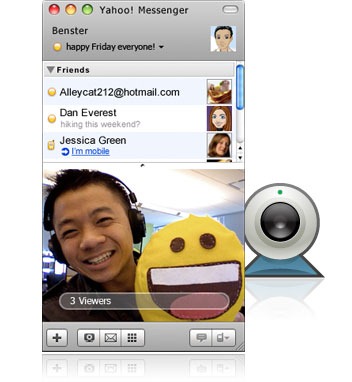
Yahoo Messenger 10

Yahoo Messenger 10 đã ra mắt với người dùng internet. Có nhiều cách để sử dụng phiên bản mới nhất này.


Cách 1: Update từ phiên bản cũ lên phiên bản mới. Đây là tính năng tự động nên rất tiện lợi. Mình đã dùng cách này để update từ phiên bản 9 lên phiên bản 10. Để thực hiện tính năng này, từ chương trình yahoo messenger 9, chọn Help > Check for updates...


Cách 2 là tải trực tiếp từ yahoo tại: http://rd.software.yahoo.com/msgr/10/msgr10us.exe


Cách 3 là nếu bạn không cài online thì tải phiên bản cài offline tại: http://download.yimg.com/ycs/msg/dl/msgr10/us/ymsgr1000_1102_us.exe ( gần 17MB)


Các tính năng của yahoo 10 thì khỏi phải bàn rồi đúng không :) Các bạn cứ update mà dùng nhé ;)

16/11/09

Hệ điều hành Chrome OS có thể được tải từ tuần tới


Hệ điều hành dành cho máy tính được Google công bố hồi tháng 7 sẽ được cho phép download dùng thử trong vài ngày tới.
Đây là thông tin website công nghệ Tech Crunch trích dẫn "từ một nguồn đáng tin cậy". Người sử dụng mong muốn có thể cài đặt Google OS trên bất cứ máy tính nào và chúng sẽ hoạt động mà họ không phải quan tâm tới khả năng tương thích của các trình điều khiển (không hỗ trợ đầy đủ trình điều khiển, hệ điều hành sẽ trở nên vô dụng).
Tuy nhiên, Tech Crunch cho rằng chắc chắn Chrome OS không thể chạy trên mọi desktop và laptop. Google sẽ đưa ra một danh sách những hệ thống phù hợp với hệ điều hành mới, chẳng hạn Asus Eee PC.
Trước đó, hãng này tuyên bố hợp tác với Acer, Adobe, Asus, Freescale, Hewlett-Packard, Lenovo, Qualcomm, Texas Instruments và Toshiba trong dự án Chrome OS. Netbook được trang bị hệ điều hành Google sẽ xuất hiện vào nửa sau 2010.
Châu An

13/11/09

High School Level - Chemistry [Video Trainning] | 5,11 GB

High School Level - Chemistry [Video Trainning] 5,11 GB
Avi 512 x 384 100 kbps
Taught by Frank Cardulla Retired, Niles North High School, Chicago, Illinois M.S., University of Illinois
30 lectures, 30 minutes/lecture $254.95


Chemistry teachers will tell you that there is an experience they have all had many times. Someone will ask them, "What do you do for a living?" and when they reply, "I'm a chemistry teacher," the all-too-common response is:

"That was my worst subject!"

Why is that? Is high school chemistry just so intrinsically difficult that only students with great intellectual gifts are capable of succeeding without heroic efforts?

The Easiest Class in School

Professor Frank Cardulla doesn't believe that for a moment, and he will hopefully convince you, as he has thousands of high school students, that "chemistry is the easiest class in school."

Students often claim it is the math that is difficult. But high school chemistry normally only demands that students be able to add, subtract, multiply, and divide numbers and do some simple algebra. Calculators take care of the first four, and most students can handle the latter.

It's not the math that some students find difficult. It's the requirement to engage in what might be called "quantitative reasoning"—the ability to take the numbers presented in what are often called "word" or "story" problems and put them together in the proper way to arrive at the correct answer. Should the numbers be multiplied or divided? And if divided, how do you know which number to put in the numerator and which in the denominator?

This difficulty is far and away what "turns off" many students to chemistry, and it is addressing this difficulty that is the focus of these chemistry lectures.

The Hardest Parts Have Simple Answers

As Professor Cardulla puts it, "My goal in these lectures is not to quickly cover every topic that is typically included in most high school chemistry courses. Most students don't need a lot of help learning element symbols or memorizing definitions. With reasonable effort they can learn the basic structure of atoms and how the Periodic Table works. That isn't the stumbling block. It's quantitative reasoning—solving those story problems. It's the mole concept and its application to stoichiometry, molarity, and equilibrium. This is what frustrates so many, because they think solving these kinds of problems requires either some exceptional intellect or some kind of 'special' approach totally divorced from the kind of quantitative reasoning we all use naturally and often effortlessly in everyday life. It doesn't."

He justifies this statement by showing how "chemical" reasoning is nothing more than an extension of the kind of quantitative reasoning that most of us use every day. Once this base is firmly established, this simple, natural reasoning is then applied to most of the important problem-solving situations that face high school chemistry students, from density, to the mole, to molarity, stoichiometry, and equilibrium.

Genuine Understanding that Lasts

Professor Cardulla refuses to have students learn mathematical "gimmicks" that allow them to obtain correct answers to simple problems without any real understanding, only to have them fall apart later when problems are encountered that demand understanding.

Instead, he establishes a firm foundation—a foundation based on a real and deep understanding of basic concepts and how one can apply the kind of simple, natural quantitative reasoning we all use every day to what are truly simple chemistry problems once this basic understanding is established. It is this basis of true understanding that makes chemistry "the easiest class in school."

Professor Cardulla has published articles and given numerous presentations about this simple, logical approach, and the achievements of his students bear testimony to its effectiveness. He has received citations from institutions such as MIT and the University of Chicago for being named "most influential teacher" by attending students.

He has received several teaching awards, among them the Davidson Award, a Presidential Award for Science Teaching, the National Catalyst Award for Outstanding Chemistry Teaching, and the National James Bryant Conant Award. The latter two are given to only one high school chemistry teacher in the entire United States each year.

Throughout this tutorial, Professor Cardulla uses, in equal measure, the blackboard, a flipchart on an easel, and computer-generated graphic screens to illustrate his lessons, which also include about a dozen physical demonstrations.

http://www.teach12.com/ttcx/CourseDescLong2.aspx?cid=111

Tải về:
http://www.mediafire.com/?sharekey=456901f95b847227a0f2f20c509059d9e4910f7805e0c1cd3e34c0a955f98962

You Scrobble: sự kết hợp hoàn hảo giữa YouTube và last.fm

Tận dụng cơ sở dữ liệu video clip nhạc khổng lồ của YouTube và nguồn thông tin chi tiết về các ca sĩ/ban nhạc trên last.fm, dịch vụ mới cáu You Scrobble sẽ mang đến cho người dùng những trải nghiệm nhạc số trực tuyến rất thú vị.
Nếu hâm mộ ca sĩ/ban nhạc ngoại quốc nào đó, You Scrobble là địa điểm lý tưởng mà bạn nên ghé thăm. Không chỉ cung cấp nguồn video clip phong phú về các ca sĩ/ban nhạc nổi tiếng, sắp xếp video clip theo album rất rõ ràng, cho phép tạo playlist nhạc ưa thích để nghe lại lúc rãnh rỗi hoặc chia sẻ với cộng đồng, You Scrobble còn cung cấp tiểu sử chi tiết về ca sĩ/bạn nhạc mà bạn mến mộ, đặc biệt là tích hợp sẵn trình download cũng như hỗ trợ chuyển đổi video clip thành mp3 chất lượng cao (chạy trên nền Java).
- Nếu máy tính cài sẵn Internet Download Manager, bạn có thể dễ dàng tải video clip tại You Scrobble (định dạng flv) với số lượng không giới hạn cũng như nhanh hơn bằng cách nhấp vào biểu tượng Download this video xuất hiện phía trên màn hình trình chiếu clip, tiếp đó sử dụng phần mềm của hãng thứ ba để trích nhạc mp3 từ file flv nếu có nhu cầu (chẳng hạn dùng phần mềm miễn phí AoA Audio Extractor, tải tại đây (dung lượng 10,51MB).
Tiếp theo, bạn nhấp vào thẻ Music, tại cột phía bên trái gồm các mục: Artist (nghệ sĩ), Tracks (track nhạc), Categories (sắp xếp nghệ sĩ theo thể loại nhạc), People (những người dùng You Scrobble tích cực nhất trong tuần), Playlists (những playlist phổ dụng nhất tuần), Videos (những clip nhạc đáng chú ý nhất tuần).
Sau khi nhấp chọn một trong hai mục Artist hoặc Tracks, bạn sẽ không thấy thông tin gì, vì You Scrobble bắt bạn phải tìm kiếm nghệ sĩ hay bản nhạc ưa thích thông qua hộp phía trên. Ở đây, tôi gõ từ khóa linkin park và nhấn Enter (hoặc bấm nút Search) để tìm ban nhạc rock Linkin Park.

Tìm video clip nhạc trên You Scrobble rất nhanh lại rất nhiều


* Tại thẻ Tracks, You Scrobble hiển thị 38.977 video clip nhạc liên quan đến Linkin Park trên rất nhiều trang, mỗi trang gồm 20 clip.

Nút màu xanh phía dưới mỗi video clip tích hợp ba biểu tượng từ trái sang phải như sau:

1. Phát clip trực tuyến (nội dung sẽ biểu thị trong màn hình nhỏ phía phải) với tốc độ load nhanh hơn và ít bị đứng hình hơn so với khi xem video clip tại YouTube.

2. Tải video clip về máy bằng tiện ích chạy trên nền Java của You Scrobble rồi trích xuất thành file nhạc mp3. Trong hộp thoại mở ra ở lần tải đầu tiên, bạn chờ đợi chốc lát trước khi trình download chạy trên nền Java được kích hoạt. Khi thấy hộp thoại Warning - Security xuất hiện, bạn đánh dấu ô Always trust from this publish rồi bấm nút Run. Ở hộp thoại Open mở ra, bạn chọn thư mục lưu file nhạc và bấm Open.

Tiến trình tải video clip sẽ diễn ra sau đó và biểu thị qua thẻ Downloads. Lúc tải xong, You Scrobble sẽ thực hiện nốt công đoạn trích nhạc mp3 từ video clip. Hoàn tất, file nhạc mp3 tải về sẽ được ghi nhớ trong thẻ Library.

File nhạc mp3 được lưu trong thư mục có tên giống ban nhạc (là thư mục con của thư mục đã chọn ở trên, ở đây là Linkin Park) và có chất lượng khá cao (bit rate đến 256Kbps). Nút Open Download Folder giúp bạn truy xuất nhanh đến thư mục lưu nhạc, còn nút Choose Download Folder để bạn chọn lại thư mục lưu nhạc khác.

3. Thêm nhanh video clip vào playlist. Danh sách những video clip trong playlist sẽ hiển thị dưới mục Quicklist, kèm theo nút phát và nút loại bỏ clip khỏi playlist phía phải. Phía dưới là ba nút: Clear (xóa sạch những video clip vừa thêm vào playlist để chọn lại), Save (lưu lại playlist vừa tạo, cho phép chia sẻ playlist với cộng đồng người dùng You Scrobble hoặc giữ cho riêng mình), Download (tải video clip về máy và chuyển thành nhạc mp3).

Các video clip vừa thêm vào playlist


* Muốn xem tiểu sử của Linkin Park, bạn nhấp chọn thẻ Artist, rồi nhấp vào liên kết để Show more để đọc thông tin về Linkin Park đầy đủ hơn. Danh sách các nghệ sĩ có phong cách trình diễn giống Linkin Park sẽ được liệt kê dưới mục Similar artists.

* Chuyển sang thẻ Albums, bạn sẽ biết được toàn bộ album từ trước đến nay của Linkin Park. Tất cả video clip trong mỗi album sẽ lộ diện khi bạn nhấp chuột vào tên album tương ứng.

* Thẻ Videos sẽ cung cấp một số video clip đỉnh nhất của Linkin Park.

* Nếu muốn chia sẻ địa chỉ của Linkin Park trên You Scrobble, bạn nhấp chọn thẻ Share, copy liên kết trong hộp Copy and paste this link into an email or instant message rồi gửi qua trình chat cho bạn bè, hoặc gửi email trực tiếp cho bạn bè bằng nút Send sau khi điền thông tin vào hộp To (địa chỉ email của người nhận) và Message (nội dung thư) phía dưới.

Ngoài ra, bạn có thể post lên các mạng xã hội bằng cách nhấp vào một trong các biểu tượng dưới mục Post to.

QUANG VÂN
http://nhipsongso.tuoitre.com.vn/Index.aspx?ArticleID=347082&ChannelID=16